Fix My Speaker — Remove Water and Dust Free
Your phone speaker sounds muffled. Fix it here for free — no app, no download, works on all phones.
Choose Your Cleaning Mode
Fix My Speaker
Select a mode · Set volume to max · Press Play
Your phone speaker sounds muffled. Something feels wrong. That frustration is real. In many cases, it is also fixable.
Water and dust are the two most common reasons phone speakers stop working clearly. Most people try rice, shaking, or a hair dryer first. None of those methods reach water trapped behind the speaker membrane. Leaving moisture inside the speaker for too long can make the problem harder to fix.
This Fix My Speaker tool helps remove water and dust using targeted sound frequencies. You will learn why your speaker sounds muffled, which cleaning methods actually work, and when professional repair makes sense. Want to understand the process first? Read the How It Works section below.
What Is Fix My Speaker?
Fix My Speaker is a free browser-based tool that uses sound frequencies to help remove water and dust from phone speakers. No app or download is needed. Open this page in any browser, and the tool is ready to use. It works on phones like Samsung Galaxy, Redmi Note, Realme, Vivo, OnePlus, and iPhone.
The tool offers three cleaning modes: Water Eject, Dust Cleaner, and Deep Clean. Each mode plays a sound through your speaker to create vibration. These vibrations help move trapped water or loose dust out through the speaker opening.
Phone speaker problems are common after rain, bathroom steam, sweat, dust, or accidental drops. Samsung notes that water in the speaker hole can make sound unclear and cause crackling during calls. More than 1 billion smartphones ship globally each year, making water and dust damage one of the most common everyday phone problems.
Use one cleaning cycle first, then test your speaker. If the sound improves, repeat once or twice. If the speaker stays silent, distorted, or very weak after multiple cycles, it may need professional repair.
How to Use Fix My Speaker — Step by Step
Select a cleaning mode, set your volume to maximum, and press Play.
Before You Start
- Restart your phone once. This rules out software-related audio issues before cleaning.
- Turn your phone volume to maximum. Lower volume means weaker vibrations and weaker results.
- Disconnect all Bluetooth devices like earphones, headsets, or external speakers. The tool must play through your built-in speaker only.
- Remove your phone case. Cases can trap ejected water against the speaker opening.
- Unplug any charging cable. Do not run the tool while your phone is charging.
- Wipe the outside with a dry microfiber cloth to remove visible surface water.
Water Eject Mode — For Wet Speakers
Use Water Eject mode if your phone got wet from rain, a toilet drop, a sink, or a pool.
This mode plays a sound at around 165Hz through your speaker. The vibration helps disrupt the surface tension of trapped water and pushes it outward through the speaker opening.
- Select Water Eject mode from the tool above.
- Place your phone on a flat surface with the speaker facing downward. Gravity helps pull water out as the sound pushes it forward.
- Keep a dry microfiber cloth nearby. Gently blot any water appearing on the speaker grill to stop it entering again.
- Press Play and keep the screen active for the full cycle. The recommended duration is 60 to 90 seconds per run.
- Repeat two to three times for heavy exposure like a pool or sink drop.
- Wait 30 seconds between each cycle before running again.
Dust Cleaner Mode — For Muffled or Blocked Sound
Use Dust Cleaner mode if your speaker has been getting quieter over days or weeks without any water exposure.
This Samsung mode sweeps through variable frequencies rather than playing one fixed tone. The shifting sound pressure helps dislodge dry particles like pocket lint, dust, and fine debris. Budget Android phones like the Samsung Galaxy M-series, Redmi Note, Realme C-series, and Vivo Y-series are especially prone to dust blockage.
- Select Dust Cleaner mode from the tool above.
- Hold your phone normally. No tilting is needed for dust removal.
- Press Play and let the full cycle run without interruption. The recommended duration is around 2 minutes.
- Repeat once more if the sound is still partially muffled after the first cycle.
Deep Clean Mode — For Stubborn Problems
Use Deep Clean mode if Water Eject and Dust Cleaner modes did not fully restore your speaker sound.
This mode runs a multi-frequency sweep designed to reach blockages that single-frequency modes may miss. Use it as a third step, not a first one. It works well for stubborn cases like dried dust, monsoon humidity damage, or prolonged water exposure.
- Select Deep Clean mode from the tool above.
- Place your phone on a flat surface with the speaker facing downward.
- Press Play and let the full cycle run for at least 3 minutes without interruption.
- For very stubborn blockages, extend the cycle to 5 minutes before testing.
- Repeat up to three times if the sound is gradually improving between cycles.
How to Test Your Speaker After Cleaning
Play a familiar song immediately after cleaning to check if the sound has improved.
A song with clear vocals and bass — like a Bollywood track — helps you notice improvement or remaining distortion quickly.
- Play at 70 to 80 percent volume first. Do not test at maximum volume immediately after cleaning.
- Listen for crackling, hissing, or a muffled underwater effect. These indicate remaining moisture or debris.
- Make a short test call to check the earpiece speaker separately from the main loudspeaker.
- Use the Sound Test tool on this page to check left and right audio channels individually.
- If sound has improved but is not fully clear, run one more cleaning cycle.
- If the speaker stays silent or heavily distorted after five full cycles, professional repair may be needed.
Phone Fell in Water? Do This in the First 5 Minutes
Act fast, but do not rush to test the speaker. Stop power, remove surface water, and keep moisture away from charging parts.
| Do This | Do Not Do This |
|---|---|
| Remove the phone from water immediately | Do not keep using the phone |
| Turn it off and leave it off | Do not turn it back on to check |
| Remove the phone case right away | Do not plug in a charger |
| Take out the SIM card and memory card | Do not use a hair dryer or heat source |
| Wipe the outside gently with a dry soft cloth | Do not rub hard or press water into openings |
| Gently tap the phone with the speaker facing down | Do not shake it aggressively |
| Keep it in a cool, dry, well-ventilated place | Do not put it in rice |
| Use silica gel packets if available | Do not poke speaker holes with cotton buds |
| Run Water Eject mode only after surface drying | Do not blow into ports or speakers |
If your phone fell in pool water or seawater, wipe the exterior carefully first. Samsung recommends rinsing saltwater or chlorinated water off with fresh water before drying, because salt and chlorine can speed up internal damage. Apple warns against putting a wet phone in rice, as small particles can enter open ports and cause further problems.
Most budget Android phones carry no official water resistance rating. Even brief rain or a sink splash can push water into the speaker opening. If your speaker sounds muffled after water exposure, that moisture is likely still sitting inside the speaker area. For light exposure, keep the phone off for at least 30 minutes. For heavy submersion, leave it off for 24 to 48 hours if possible. Once the outside feels dry, run Water Eject mode to help clear remaining moisture.
Why Your Phone Speaker Sounds Muffled
A muffled phone speaker usually has one of four causes. Identifying the right one points you to the correct fix.
Water Trapped Inside the Speaker
Water is the most common reason a phone speaker suddenly sounds muffled, quiet, or distorted.
It does not take full submersion. Rain, bathroom steam, sweat, or a quick sink splash can all push moisture into the speaker opening. During the Indian monsoon season, even a short walk in heavy rain is enough.
If your speaker sounds muffled after water exposure, trapped moisture is usually the reason. Samsung notes that water in the speaker hole can make call sounds unclear and cause crackling during calls.
Common signs your speaker has water inside:
- Sound became muffled suddenly after rain, a splash, or humidity exposure
- Audio improves briefly, then goes muffled or distorted again
- Earpiece sounds unclear or dull during phone calls
Dust and Lint Blocking the Speaker Grill
Dust and pocket lint build up gradually inside the speaker grill and reduce sound quality over weeks or months.
Pocket lint, makeup residue, and fine dust clog the tiny mesh holes and act as a sound barrier. They block clearer vocal sounds more than deeper bass sounds, which is why dusty speakers often sound dull rather than completely silent.
Entry-level Samsung Galaxy, Redmi, and Realme models are especially prone to this because their speaker grills are more exposed. Storing your phone in pockets or bags every day makes the buildup worse over time.
Common signs your speaker is blocked by dust or lint:
- Sound has been getting progressively quieter with no sudden cause
- Audio sounds muffled even at maximum volume
- No crackling — just flat, dull, reduced sound quality
A Software or Bluetooth Setting Causing the Problem
Sometimes the speaker is perfectly fine and a setting is redirecting or limiting your audio output.
This cause is easy to miss because there is no physical trigger. A connected Bluetooth device or an active audio filter can silently reroute your sound. An unequal left and right balance or a software glitch after an update can also make audio sound weak or distorted.
One useful check: if one app sounds normal while another sounds muffled, the issue is likely software rather than hardware.
Common signs the issue is software or Bluetooth:
- Sound disappeared suddenly without any water, dust, or physical impact
- Audio plays through a Bluetooth device you forgot to disconnect
- Sound changed after a recent software update or restart
Physical Damage — What It Sounds and Feels Like
A physically damaged speaker produces sounds that no cleaning tool can fix.
This usually happens after a hard drop, very loud volume use over long periods, or severe water damage left untreated. Physical damage is harsher, more consistent, and does not improve after cleaning or drying.
Common signs of physical speaker damage:
- Loud buzzing or rattling that stays consistent regardless of volume level
- Complete silence with no sound at all even at maximum volume
- Distortion that gets significantly worse as volume increases
If these signs match your situation, run the cleaning tool once to rule out water or dust. If there is no improvement, visit a service center.
How Fix My Speaker Actually Works
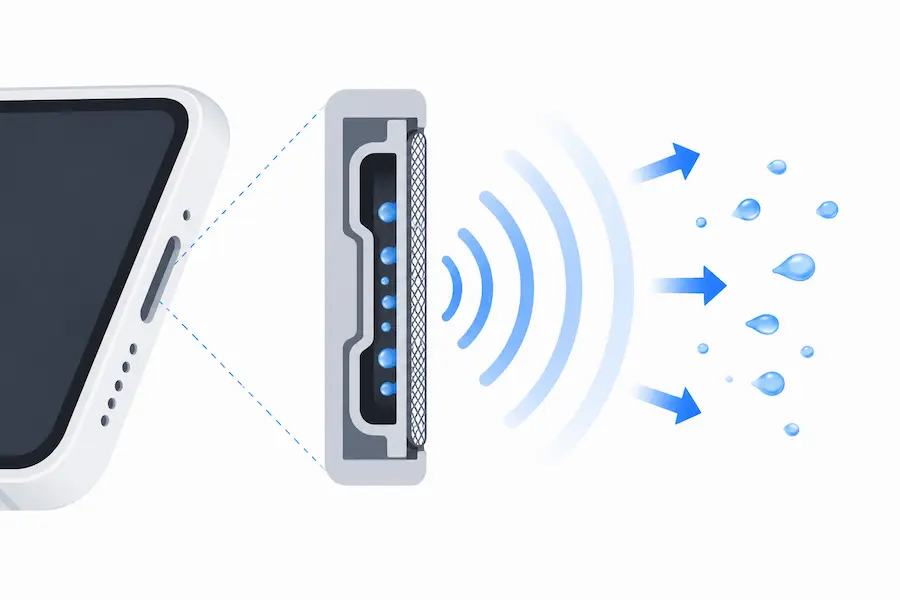
Fix My Speaker plays a sound at around 165Hz through your speaker, causing the internal membrane to vibrate and push trapped water or dust outward.
Every phone speaker has a thin internal membrane called a diaphragm. When sound plays, the diaphragm moves back and forth rapidly. Phone speakers respond strongly to low-frequency vibration. At 165Hz, that movement disrupts the surface tension holding water against the speaker mesh. Once surface tension breaks, water moves out through the speaker opening.
This is not the same as playing music at high volume. Music contains mixed frequencies that cannot consistently target the vibration needed to eject water. A cleaning tone holds one frequency throughout the cycle, and that consistency is what moves water out effectively.
Running short cycles with small pauses works better than one long continuous run. It gives water time to drain naturally before the next cycle pushes more out.
Apple introduced this acoustic ejection principle in Apple Watch Series 2 in 2016. Xiaomi later built a similar native feature called Clear Speaker into MIUI and HyperOS for Redmi and Xiaomi phones. This tool applies the same idea through any phone browser, with no app or hardware feature required.
The tool works best for water and dust blockage caught early. It cannot repair a torn diaphragm, corroded contacts, or a speaker that produces no sound at all. If there is no improvement after multiple cycles, professional repair is the right next step.
What Works and What Does Not
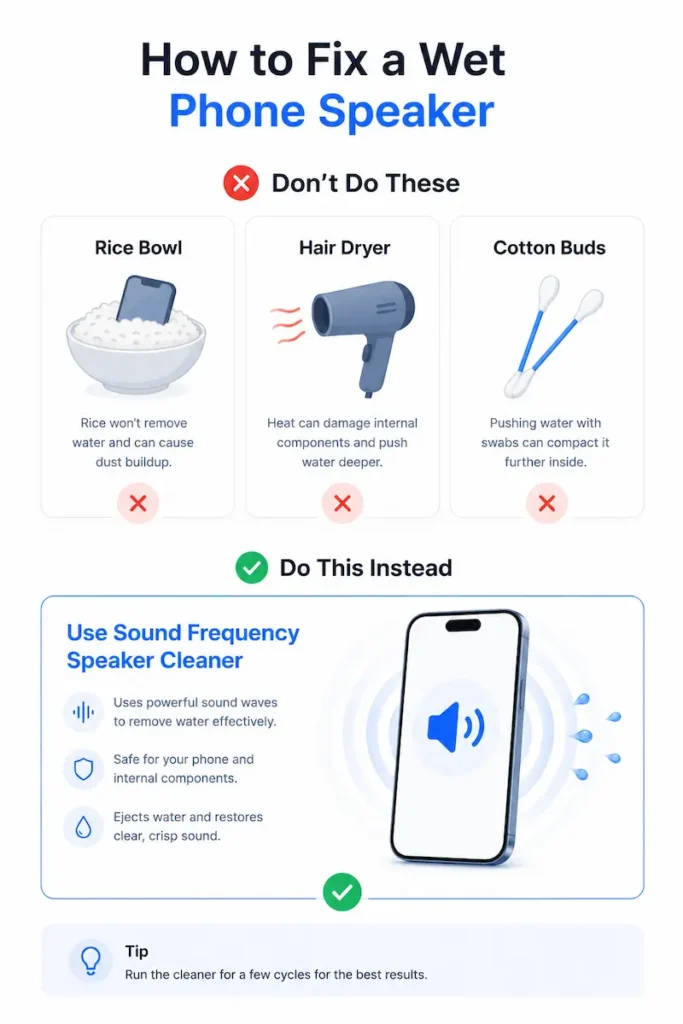
Most people try rice, heat, or cotton buds first. None of them work well for speaker water damage.
Why Rice, Hair Dryers, and Cotton Buds Do Not Work
Rice does not reach the problem. Rice absorbs moisture from the air around your phone. It cannot reach water sitting behind the speaker membrane. Apple explicitly warns against putting wet phones in rice. Rice can also leave small particles inside speaker openings and charging ports that cause further damage.
Hair dryers push water deeper. Heat forces moisture further into the device. It can also damage delicate speaker parts and internal seals. Samsung and Apple both recommend avoiding heat sources on a wet phone.
Cotton buds cause more damage. Cotton fibers tear the fine mesh over the speaker opening. Inserting cotton buds or paper towels pushes debris deeper inside instead of removing it.
What This Tool Fixes and When You Need a Repair Shop
Fix My Speaker works best in three situations: water caught within the first few hours, dust and lint blocking the speaker grill, and muffled sound from everyday use.
The tool cannot fix a torn speaker membrane, reverse corrosion from saltwater, or restore a speaker that makes no sound at all. Those problems need physical repair.
If your speaker shows no improvement after several cleaning cycles, visit a service center. Speaker repair in India costs between ₹500 and ₹2,500. Prices vary by brand, city, and warranty status.
Fix My Speaker for Samsung, Redmi, iPhone and More
Fix My Speaker works on any device that plays audio through a built-in speaker and opens a web browser. It can help with speaker-area water, dust, or muffled sound on phones like Samsung Galaxy, Redmi, Realme, Vivo, Oppo, OnePlus, Poco, and iPhone.
Samsung Galaxy: The Samsung Members app includes a built-in speaker diagnostic under the Support tab. Run that first. If the test sound plays but still sounds muffled, use Water Eject or Dust Cleaner mode on this page.
Redmi and Xiaomi Many budget Redmi and Xiaomi phones have limited or no official water resistance. Many running MIUI or HyperOS include a built-in Clear Speaker option under Settings or Additional Settings. Use that first if available, then run this tool if the speaker still sounds blocked.
Realme, OPPO, and OnePlus: Some Realme, OPPO, and OnePlus phones include a native speaker cleaner in Phone Manager or Settings. On some OnePlus OxygenOS 15 builds, it appears under Phone Manager. Try that first, then use Water Eject, Dust Cleaner, or Deep Clean mode as needed.
Vivo and POCO: Muffled sound on Vivo and POCO phones often comes from rain, dust, lint, or Bluetooth routing. Restart the phone and disconnect Bluetooth devices first. If the speaker still sounds weak, run the correct cleaning mode.
The iPhone does not include the same built-in water ejection feature as the Apple Watch. This tool works through Safari and can help with speaker-area moisture or muffled sound. Check Bluetooth, volume, and Focus settings before running it. Laptops and Earbuds The tool works through Windows laptops and MacBooks. Confirm audio output is set to internal speakers before starting. For earbuds, use extra caution — this tool is not a reliable repair method for serious water damage.
Speaker Cleaning Methods Compared
| Method | Time | Effectiveness | Risk | Cost |
|---|---|---|---|---|
| Fix My Speaker Tool ✓ | 1–3 min | High | Very low | Free |
| Silica Gel Packets | 24–48 hrs | Medium | Very low | ₹50–₹200 |
| Rice Method | 24–48 hrs | Low | Medium | Free |
| Compressed Air | 2–5 min | Medium | Medium | ₹200–₹500 |
| Hair Dryer | 5–10 min | Low | High | Free |
| Service Center Repair | 1–3 days | Very High | Very low | ₹500–₹2,500 |
For light water exposure or dust buildup, Fix My Speaker is the fastest first step. Silica gel packets can help after running the tool if the phone still feels damp. A service center is the right choice when the speaker stays silent or heavily distorted after several cleaning cycles.
Speaker Still Muffled After Cleaning? Try This
Partial improvement after the first cycle is normal. Follow these steps before visiting a repair shop.
- Run the Sound Test on this page first. Check left and right channels to confirm which side is affected.
- Run the same cleaning mode one more time. Keep volume at maximum and let the full cycle finish.
- Switch to a different mode. If you used Water Eject, try Deep Clean. If you used Dust Cleaner, try Water Eject to check for hidden moisture.
- Check Bluetooth and sound settings. A paired earphone, smartwatch, or car system can redirect audio silently. Also check for an active equalizer or volume limiter.
- Restart your phone. A restart clears temporary software issues that may affect audio output.
- Wait at least 30 minutes before retrying. Samsung notes moisture can remain in the speaker hole after cleaning. Apple recommends leaving the phone in a dry area with airflow before the next attempt.
- Use silica gel packets if the speaker still sounds damp. Leave the phone near them for a few hours before running the tool again.
If there is no improvement after all seven steps, the damage is likely physical. Visit an authorized service center. In India, basic speaker repairs often start around ₹500 to ₹1,000 for budget models. Costs vary by brand, model, and damage level. If the problem continues, contact us or visit an authorised service center.
Frequently Asked Questions
Conclusion
A muffled phone speaker is usually caused by water, dust, or a software setting rather than permanent hardware damage. Acting quickly after water exposure gives your speaker the best chance of recovery. The right cleaning mode and a little patience can often help clear common speaker problems without a repair visit.
Fix My Speaker uses targeted sound frequencies to help push water and dust out safely. It works on Samsung, Redmi, Realme, Vivo, OPPO, OnePlus, iPhone, and most other devices. It runs directly through your browser with nothing to download or install.
If the speaker stays silent or heavily distorted after several cleaning attempts, professional repair is the next step. In India, basic phone speaker repairs often start around ₹500 to ₹2,500 depending on the brand and damage level.
Start with the tool at the top of this page. Set the volume high, choose the mode that matches your problem, and press Play. Your speaker has a good chance of sounding clearer again within a few minutes.